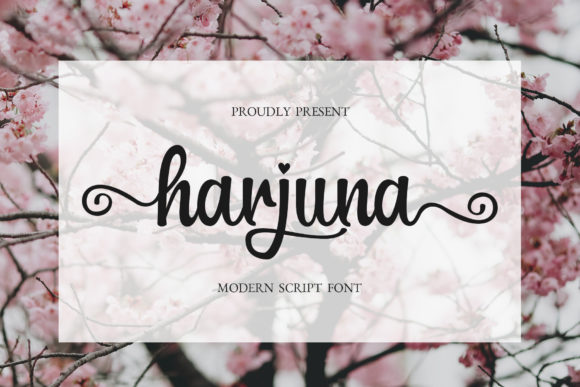
Harjuna Script: A Stylish Font for Web Design
As a web designer, I’m always on the lookout for fonts that bring personality to a site without sacrificing readability. Harjuna Script is one of those rare finds—a script font that feels both elegant and approachable. I recently tested it in a few real-world web projects, and it quickly became a favorite for headers, hero sections, and decorative elements.
Testing Harjuna Script in a Hero Section
One of my first tests was using Harjuna Script in a hero section for a boutique online store. The font’s flowing curves and romantic flair gave the page a warm, inviting feel. It worked especially well with a soft background image, where the font stood out without overpowering the design. I paired it with a clean sans serif for the body text, which created a nice contrast and kept the layout balanced.
The font’s swashes and ligatures added a touch of sophistication, making it perfect for headlines that need to grab attention. On larger screens, it looked great as a primary heading, but I noticed that on mobile devices, the font could be a bit tight if not spaced properly. Adjusting the letter spacing made a big difference, especially when placing it over dark or busy backgrounds.
Using Harjuna Script for Call-to-Action Buttons
I also experimented with Harjuna Script on a call-to-action button for a course sales page. The font’s fluidity made it stand out against a solid color background, giving the button a more personal, handcrafted feel. It wasn’t ideal for long text, but as a short phrase like “Join Now” or “Start Today,” it worked beautifully.
One thing to keep in mind is that Harjuna Script isn’t the best choice for small buttons or dense navigation menus. In those cases, a simpler font would be more readable. But for prominent CTAs, especially in creative or lifestyle-focused sites, it can add a unique visual identity.
Pairing Harjuna Script with Other Fonts
Font pairing is key when using a decorative script like Harjuna Script. I found that pairing it with a modern sans serif, such as Montserrat or Poppins, created a clean and professional look. For editorial-style websites, combining it with a classic serif like Georgia or Playfair Display added a timeless elegance.
When working on a blog redesign, I used Harjuna Script for the title and subheadings, while keeping the body text in a simple, easy-to-read font. This helped maintain visual hierarchy without overwhelming the reader. It’s important to test different pairings to find what works best for your specific project and audience.
Harjuna Script in Responsive Layouts
Responsive design is a must for any modern website, and Harjuna Script performed well across different screen sizes. On desktop, the font’s details were clearly visible, but on smaller screens, I had to adjust the font size and line height to ensure it remained legible. It also looked good when used as an overlay on image banners, adding a subtle layer of style without distracting from the main content.
For a landing page I was working on, I used Harjuna Script in a header that floated over a video background. The font’s organic flow complemented the motion of the video, creating a cohesive and immersive experience. However, I avoided using it in any areas with high information density, as it could become hard to read in crowded layouts.
Considerations for Web Use
Before implementing Harjuna Script on a live site, it’s important to check the available styles, weights, and file formats. Make sure the font includes all necessary characters for your target language, and verify that the licensing allows for commercial use if you’re designing for clients or selling digital products.
Another consideration is performance. Web fonts can affect load times, so it’s wise to optimize the font files and only include the weights and styles you need. If you’re using Harjuna Script for a large-scale project, consider using a subset of the font to keep things fast and efficient.
Overall, Harjuna Script is a versatile and stylish choice for web designers looking to add a touch of personality to their sites. Whether you’re working on a portfolio, an online store, or a marketing campaign, this font can elevate your design while maintaining clarity and professionalism.