Lucemita Script: A Handwritten Font for Web Design
As a web designer, I’m always on the lookout for fonts that bring personality to digital spaces without sacrificing usability. Lucemita Script has become one of my go-to choices when I want to add a touch of warmth and creativity to a website’s visual language. It’s a handwritten typeface with a soft, friendly vibe that feels like it was drawn by hand—perfect for projects that need a human touch.
A Warm, Handwritten Vibe for Digital Projects
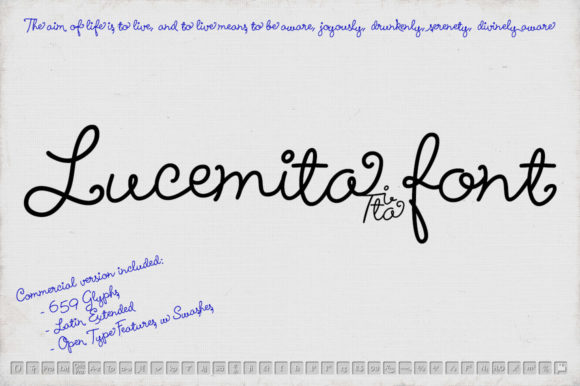
Lucemita Script is designed to feel natural, as if it was sketched on paper with a fine marker before being digitized. This gives it a subtle imperfection that makes it stand out from more rigid, machine-made fonts. Its flow is smooth but not too formal, making it ideal for headers, logos, and decorative text that needs to feel approachable and inviting.
I’ve used it in a few recent projects, including a boutique online store and a creative portfolio site. In both cases, it added a sense of authenticity that helped the brand feel more personal. Whether it’s a hero section headline or a call-to-action button, Lucemita Script brings a light-hearted energy that works well with modern, clean design systems.
Perfect for Headers, Logos, and Decorative Accents
One of the best things about Lucemita Script is how well it performs in display roles. It shines brightest when used for short phrases, titles, and headings rather than long paragraphs. On a landing page, for example, it can be used to highlight key messages or create visual contrast against simpler body fonts.
I tested it on a product landing page where the main headline needed to catch attention while still feeling elegant. The font’s swashes and gentle curves gave the text a refined yet playful look that matched the brand’s tone perfectly. It also worked well as a logo treatment, adding a custom feel without needing to hire a designer.
When paired with a clean sans serif font like Open Sans or Lato, Lucemita Script creates a balanced and professional look. This pairing is especially useful for websites that need to maintain readability while still having a unique visual identity.
Responsive Design and Mobile Usability
One concern I had when testing Lucemita Script was how it would perform on mobile devices. Fortunately, it scales well and remains legible even at smaller sizes. I used it on a mobile-first blog header, and it looked great on both large screens and smaller phones.
On dark backgrounds or image overlays, the font still holds up, though I found that using a slightly bolder weight helped it stand out more. For buttons and CTAs, I kept the text size around 20px to ensure it was easy to read without overwhelming the design.
It’s worth noting that Lucemita Script isn’t meant for body copy. Using it for long paragraphs would make the text hard to scan and could hurt user experience. But for headlines, subheadings, and short phrases, it’s a solid choice that adds character without sacrificing clarity.
Webfont Availability and Licensing
For web designers, the availability of webfonts is crucial. Lucemita Script comes with webfont formats, which means it can be easily integrated into a website using Google Fonts or custom CSS. This makes it a practical option for client projects and commercial sites alike.
I checked the licensing terms before using it on a client’s site, and everything looked good. The font is available for commercial use, which is important for designers who work on online stores, SaaS platforms, or brand assets. It also includes multiple weights and alternates, giving flexibility for different design needs.
For those working on multilingual sites, I recommend checking if the font supports all the necessary characters. While Lucemita Script seems to handle basic Latin characters well, it’s always a good idea to test it with your specific content before finalizing a design.
Real-World Applications for Web Designers
Lucemita Script has proven to be versatile across different types of websites. On a coaching platform, it was used for course titles and feature highlights, giving the site a friendly and trustworthy feel. On a digital product landing page, it served as the primary font for the hero section, helping to draw attention to key offerings.
It also works well for social media graphics and email templates, where a bit of personality can go a long way. I’ve used it in a few promotional banners and found that it added a nice contrast to more neutral background designs.
Overall, Lucemita Script is a great addition to any web designer’s toolkit. It’s not a one-size-fits-all font, but when used in the right context, it can elevate a design and make it feel more authentic and engaging.