Malibu Script: A Stylish Display Font
There I was, staring at a blank brand board, trying to find the right visual voice for a new boutique coffee shop. The client wanted something warm, inviting, and a little bit whimsical. I reached for my usual go-to fonts, but they felt too predictable. That’s when I stumbled on Malibu Script. It wasn’t just another script font—it had a certain charm that made me pause and think about how it could elevate the entire brand.
A Blend of Old and New
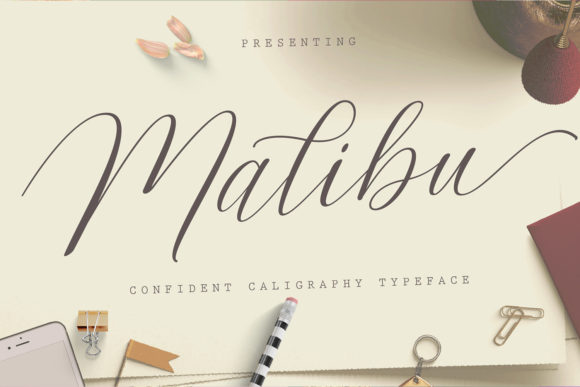
Malibu Script is a splendid script font that beautifully combines classic calligraphy with a modern feel. Its flowing lines and elegant swashes give it a timeless quality, while its clean, open shapes keep it from feeling overly ornate. It has a personality that’s both refined and approachable, making it perfect for brands that want to stand out without sacrificing professionalism.
The font’s character is best described as playful yet polished. It works well in contexts where a touch of sophistication is needed, but not so much that it feels out of place. Whether it’s a logo, a social media header, or a packaging label, Malibu Script brings a sense of warmth and individuality to any design.
Testing Malibu Script in Real Projects
I first tested Malibu Script on a logo concept for the coffee shop. I paired it with a simple sans serif font for balance, and the combination felt natural. The script font added a personal, handcrafted feel, while the sans serif kept things grounded. On a business card, it looked great as a headline, standing out without being overwhelming.
When I used it on a packaging mockup, the font really shone. The subtle variations in stroke weight gave it depth, and the overall flow made it easy to read even at smaller sizes. It worked well as a product name or tagline, adding a unique flair that made the packaging more memorable.
On a website header, Malibu Script added a nice contrast against a more neutral background. It was bold enough to draw attention but not so flashy that it distracted from the content. In social media graphics, it helped create a cohesive look across different platforms, reinforcing the brand’s visual identity.
Best Uses and Limitations
Malibu Script is best suited as a display or headline font. It excels in short phrases, titles, and logos where its elegance can be fully appreciated. It’s not ideal for long body text or small sizes, where its intricate details might become hard to read. For formal corporate use, it may feel too casual, but in creative or lifestyle-oriented brands, it can be a strong asset.
It’s also worth noting that Malibu Script performs well in editorial design, especially for magazine covers, book titles, or promotional materials. Its visual appeal makes it a good choice for projects that need a touch of class and creativity.
Font Pairing and Design Tips
When pairing Malibu Script with other fonts, it’s best to go for contrasts that highlight its strengths. A clean serif or sans serif font often works well, as it provides a solid foundation for the script’s fluidity. For a more modern look, pairing it with a geometric sans serif can add a fresh, contemporary edge.
If you’re working on a project that requires multiple weights or styles, check if Malibu Script includes alternates, ligatures, or swashes. These features can add variety and make the font more versatile. Also, consider multilingual support if your project involves non-English text.
Before using Malibu Script in final client work, test it in different sizes and contexts. Print it out, view it on screens, and see how it looks in both light and dark environments. This will help ensure that it meets the project’s needs and doesn’t cause any unexpected issues.
Commercial Use and Licensing
As with any commercial font, it’s important to review the licensing terms before using Malibu Script in client projects. Make sure you have the appropriate rights for web use, print, and digital products. This is especially crucial if you’re creating templates, merchandise, or print-on-demand items, as font licenses can vary widely depending on the intended use.
Malibu Script is available in various file formats, including OTF and WOFF, making it easy to integrate into design workflows. If you’re working on a website, check if the font is available as a webfont to ensure smooth rendering across devices.